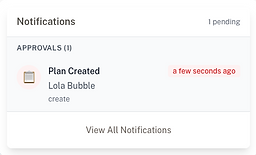
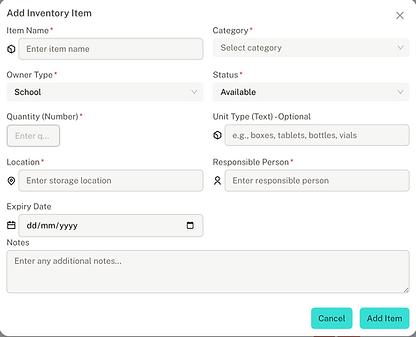
Notifications Centre

Core functionality:​​
​Receive in-time notifications for a range of different events that require attention such as plan approvals or medical evens
When a user clicks the notifications bell icon the system will automatically find any events that require action.​​​​​​​​​​​


Basic Actions
​
The notifications centre has 3 guises:
​
-
Visible bell icon to alert the user ​
-
A small modal that opens up click
-
A side drawer that provides more detailed information
Advanced management​
​
The side drawer will alert you to different action types and automatically sort into soonest first so a user can take action to the most important events.
​
The side drawer stays open until you choose to close which allows navigation throughout the application without losing focus on the most important part of the application - the medical events requiring action.
​
Important note!
​
-
Events are checked: 30 min ago to 2 hours ahead
-
Alerts show: From 30 min before until 30 min after
-
Then disappear: After being 30+ minutes overdue
Critical alerts
Core functionality:​​
Critical alerts change colour based on the urgency of the actionable item​​​​​​​​​​
Basic actions - When Alerts Appear:
30 Minutes Before (if enabled)
-
Shows when event is 30 minutes away
-
Urgency: urgent
15 Minutes Before (if enabled)
-
Shows when event is 15 minutes away
-
Urgency: urgent
5 Minutes Before (if enabled)
-
Shows when event is 5 minutes away
-
Urgency: critical
Due Now (if enabled)
-
Shows when event is 0-2 minutes away
-
Urgency: critical
Overdue (if enabled)
-
Shows when event is 0-30 minutes past due time
-
Urgency: critical
When Alerts STOP Showing:
-
More than 30 minutes overdue → Alert disappears
-
This prevents old events from cluttering the notification list


Advanced functionality:​​
Clicking on an event in the notification centre (when the user has navigated to and is showing the event page) will highlight the event in the main application for action.
Clicking on the 3 dots (more actions button) will allow you to view further details and mark the event as done​​​​​​​​​

Students
At its core, the Students page is a comprehensive, real-time list of every student in your school. It's built for speed and clarity

Core functionality:​​
​
-
View All Students: See your complete cohort at a glance, with key information presented in a clean table view on desktops or intuitive cards on mobile devices.
-
Instant Search: Find any student in seconds. Just start typing a name, ID, or even a health plan name into the search bar, and the list filters instantly.​
​​​​​​​​​

Basic Actions:
​
-
Add Students Individually: A simple click on the "Add Student" button opens a straightforward form, allowing you to enroll new students into the system quickly.
-
Reset with Ease: Clear all your filters with a single click to return to the full student roster.Granular Filtering:
-
Go beyond simple searching.Combine multiple filters to create specific views. Need to see all "active" female students in "Year 5" who require "Extra Care"

Advanced Management:
​​​​​
-
It only takes a few clicks.Bulk Data Management: Use the "Import/Export" feature to handle large-scale data operations. Download a pre-formatted template to ensure your data is correct, then upload a CSV to add many students at once, saving hours of manual entry.
-
Click on any student to navigate directly to their detailed profile, giving you a 360-degree view of their information.
The Students page is the central pillar that supports the entire application. Its interoperability is key to a seamless workflow:Health Plans & Events:
When you search for a student, you're also searching their associated health plans. This creates a direct link between a student's record and their care needs, allowing you to quickly find students with specific conditions.
All events in the Events Schedule and Master Log are tied back to the students on this list.
​

The Students page isn't just a list.....it's the dynamic foundation of your meddiCAL system, ensuring that accurate and accessible student information empowers every other feature of the application.
Student Health Plans
Track medical conditions, medications, allergies, and emergency contacts. Keep students safe with real-time updates accessible to parents, teachers, and healthcare providers.
Core Functionality:​​
​
-
Health plans are created by parents and sent to school, childcare or sporting organization for review and acceptance.
-
Health plans can consist of medicated and non-medicated care.
-
Health plans can also be regular care (regular events created) or occasional care (a plan that might be referred to from time to time when needed
​
All in a modern and easy to use mobile friendly interface
​​​​​​​​​

Basic Actions​
​
-
Events are only created when either the school has accepted or created a health.
-
Events are then monitored by staff and medication / care is given in accordance to the strict guidelines within the plan
-
Events can be medicated care or watch & act plans
-
All details of care required is listed within each event to ensure that is no discrepncies
​​​​​​​​​

Camps
The Camps Management page is your central dashboard for all school trips. It replaces scattered paperwork and confusing spreadsheets with a single, clear, and interactive view. At a glance, you can:

Managing an Existing Camp
​
From the Camp interface, a user can perform several actions on a specific camp via a dropdown menu.
The three main actions are:
-
View Details: A read-only dialog showing camp information and the full list of attending students.
-
Manage Students: A dialog where staff can search, filter, and select students to add or remove them from the camp.
-
Edit Camp: A dialog, pre-filled with the camp's data, allowing for updates to its name, location, or dates.
​
Integration with Events
​
User navigates to '/events' page & Clicks "Filter by Camp" dropdown, Selects an active camp from the list
​
The Event Schedule Table is automatically filtered to show only:
-
Events for students assigned to the camp.
-
Events that occur within the camp's start and end dates
​
With the Camps Management page, you’re not just planning a trip; you’re building a self-contained, fully integrated, and safety-focused operational plan for every off-site event.
Events
At its heart, the Events page is a dynamic, centralized calendar that displays every single health-related event for your students. It's your go-to screen for seeing exactly what needs to be done, when it needs to be done, and for whom. It clearly lists:


Managing your Events:
​​​
-
Scheduled Medications: All recurring medication events automatically generated from student health plans.
-
Ad-hoc Events: Any unplanned incidents, such as a sick bay visit or an unexpected medication administration.
-
At-a-Glance Status: Color-coded badges instantly tell you if an event is waiting, dispensed, logged, or missed, so you can see what's outstanding in seconds.
Basic Actions:
​
-
Dispense with Confidence: When it's time to administer medication, simply click the "Dispense" button. A confirmation dialog appears with all the necessary details, allowing you to log the event accurately.
-
Quickly View Details: Hover over any completed event to see who administered the medication, who witnessed it, and any notes, all without leaving the page.
-
Responsive View: The schedule works beautifully on any device. On a desktop, you get a detailed table; on a tablet or phone, it transforms into a clear, touch-friendly list of cards.
Advanced Management:
​
-
Powerful Multi-Filtering: This is where the Events page truly shines. You can instantly drill down to find exactly what you need by combining multiple filters:
-
Filter by Camp: Instantly view the medication schedule for a specific camp or excursion.
-
Filter by Medication: See all upcoming administrations for a specific medication, like "Salbutamol".
-
Filter by Status: Quickly isolate all "missed" events that require follow-up.
-
Filter by Date Range: Look at a specific day, week, or a custom date range.
-
-
Intelligent Search: The search bar goes beyond names. You can search for a student, a medication, or even text within an event's description to pinpoint specific logs.​​​
The Events Schedule is the central hub where data from all other parts of the application converges into a single, actionable view.
​
-
Student Health Plans: This is the direct output of what you create in the Health Plans. Every scheduled medication you set up for a student automatically appears here on the correct date and time, creating a seamless link from plan to practice.
-
Camps Management: When you select a camp from the filter dropdown, the Events page instantly syncs with the Camps module. It cross-references the camp's attendee list and its date range to show you only the events relevant to that specific camp.
-
Master Log: Every action taken on this page—every dispensed or missed medication—is automatically and permanently recorded in the Master Log, providing a complete and detailed audit trail for compliance and reporting.
-
Header Alerts: The "Events Today" alert in the main application header is a live summary of this page, giving you a constant, high-level overview of upcoming and missed events so you never lose track of the day's critical tasks.

The Events Schedule is more than just a calendar; it's the operational heartbeat of meddiCAL, ensuring that every student receives the right care at the right time, every time.
Parent Portal
Communication with parents and guardians of students is an integral part of care at school. with mymeddiCAL's parent portal. Health plans can be created and approved & events are visible in real time for parents/guardians through a mobile first interface.

​
​Managing your child's care/health plans:
​
Guardian-Initiated Care Plans​
-
Medication administration (antibiotics, inhalers, etc.)
-
Non-medication care (first aid, monitoring protocols)
-
Special instructions (allergy alerts, behavioral support)
-
Temporary accommodations (injury recovery, seasonal concerns)
​
How it works:
-
Guardian logs in and clicks "Request Care Plan"
-
Selects child and care type
-
Describes the care needed with start/end dates
-
Submits for school approval
-
Receives confirmation and status updates
​
Once plan is approved and activated, the system:​​
-
Routes plan to all listed guardians
-
Tracks each guardian's approval independently
-
Notifies everyone when all approvals received
-
Escalates if one guardian disagrees
​
​​

Event Creation Upon Approval
When a plan is approved, the system automatically creates medical events in the school calendarAssigns to responsible staff memberSets medication reminders and alertsNotifies nursing staff of new planLogs approval in audit trail**
No manual data entry - eliminates transcription errors!
Staff
The Staff Service provides granular control of the functions within the mymeddiCAL school. All roles gain the appropriate view of the student body and critical events that need to be executed while the certifications panel is a spot to keep track of current and expiring accreditations.

Managing Staff within mymeddiCAL
​
All staff are loaded within the application which (when on a premium subscription) will provide a login to the interface.
​
Staff views are set around their year level and class where nurses and leadership can have a whole of org view.
​
Once the list is populated it's up to the Administrator to invite each staff member so they can access and begin to monitor, track and control medications within the school or excursion or camp.
​
Managing certifications within mymeddiCAL
​
As part of the premium subscription offering, staff can have unlimited certifications loaded into the application.
​
Certifications could be:
​
-
Medication accreditations
-
Working with Children's check
​
Expiry dates will notify the admin of mymeddiCAL with plenty of time to update
​
​